


Accelerated Video Decoding with NVDEC¶
This tutorial shows how to use Nvidia’s hardware video decoding (NVDEC)† with TorchAudio.
NOTE
This tutorial is authored in Google Colab, and is tailored to Google Colab’s specifications.
Please check out this tutorial in Google Colab.
If you install FFmpeg following this tutorial, please adjust the build configuration accordingly.
To use NVDEC with TorchAudio, the following items are required.
Nvidia GPU with hardware video encoder.
FFmpeg libraries compiled with NVDEC support.
PyTorch / TorchAudio with CUDA support.
TorchAudio’s binary distributions are compiled against FFmpeg 4 libraries, and they contain the logic required for hardware-based decoding.
In the following sections, we build FFmpeg 4 libraries with NVDEC support and enable hardware acceleration through TorchAudio’s StreamReader API. We then compare the time it takes to decode the same MP4 video with CPU and NVDEC.
† For details on NVDEC and FFmpeg, please refer to the following articles.
https://docs.nvidia.com/video-technologies/video-codec-sdk/nvdec-video-decoder-api-prog-guide/
https://docs.nvidia.com/video-technologies/video-codec-sdk/ffmpeg-with-nvidia-gpu/#compiling-ffmpeg
https://developer.nvidia.com/blog/nvidia-ffmpeg-transcoding-guide/
Check the available GPU¶
[1]:
!nvidia-smi
Wed May 18 03:17:57 2022
+-----------------------------------------------------------------------------+
| NVIDIA-SMI 460.32.03    Driver Version: 460.32.03    CUDA Version: 11.2     |
|-------------------------------+----------------------+----------------------+
| GPU  Name        Persistence-M| Bus-Id        Disp.A | Volatile Uncorr. ECC |
| Fan  Temp  Perf  Pwr:Usage/Cap|         Memory-Usage | GPU-Util  Compute M. |
|                               |                      |               MIG M. |
|===============================+======================+======================|
|   0  Tesla K80           Off  | 00000000:00:04.0 Off |                    0 |
| N/A   36C    P8    28W / 149W |      0MiB / 11441MiB |      0%      Default |
|                               |                      |                  N/A |
+-------------------------------+----------------------+----------------------+

+-----------------------------------------------------------------------------+
| Processes:                                                                  |
|  GPU   GI   CI        PID   Type   Process name                  GPU Memory |
|        ID   ID                                                   Usage      |
|=============================================================================|
|  No running processes found                                                 |
+-----------------------------------------------------------------------------+
Update PyTorch and TorchAudio with nightly builds¶
Until TorchAudio 0.12 is released, we need to use the nightly builds of PyTorch and TorchAudio.
[2]:
!pip3 uninstall -y torchaudio torch
!pip3 install --pre torch torchaudio --extra-index-url https://download.pytorch.org/whl/nightly/cu113
Found existing installation: torchaudio 0.11.0+cu113
Uninstalling torchaudio-0.11.0+cu113:
  Successfully uninstalled torchaudio-0.11.0+cu113
Found existing installation: torch 1.11.0+cu113
Uninstalling torch-1.11.0+cu113:
  Successfully uninstalled torch-1.11.0+cu113
Looking in indexes: https://pypi.org/simple, https://download.pytorch.org/whl/nightly/cu113
Collecting torch
  Downloading https://download.pytorch.org/whl/nightly/cu113/torch-1.12.0.dev20220517%2Bcu113-cp37-cp37m-linux_x86_64.whl (2098.0 MB)
     |████████████████████████████████| 2098.0 MB 7.8 kB/s
Collecting torchaudio
  Downloading https://download.pytorch.org/whl/nightly/cu113/torchaudio-0.12.0.dev20220517%2Bcu113-cp37-cp37m-linux_x86_64.whl (3.7 MB)
     |████████████████████████████████| 3.7 MB 27.8 MB/s
Requirement already satisfied: typing-extensions in /usr/local/lib/python3.7/dist-packages (from torch) (4.2.0)
Installing collected packages: torch, torchaudio
Successfully installed torch-1.12.0.dev20220517+cu113 torchaudio-0.12.0.dev20220517+cu113
Build FFmpeg libraries with Nvidia NVDEC support¶
Install NVIDIA Video Codec Headers¶
To build FFmpeg with NVDEC, we first install the headers that FFmpeg uses to interact with Video Codec SDK.
[3]:
!git clone https://git.videolan.org/git/ffmpeg/nv-codec-headers.git
!cd nv-codec-headers && sudo make install
Cloning into 'nv-codec-headers'...
remote: Enumerating objects: 808, done.
remote: Counting objects: 100% (808/808), done.
remote: Compressing objects: 100% (688/688), done.
remote: Total 808 (delta 437), reused 0 (delta 0)
Receiving objects: 100% (808/808), 154.95 KiB | 755.00 KiB/s, done.
Resolving deltas: 100% (437/437), done.
sed 's#@@PREFIX@@#/usr/local#' ffnvcodec.pc.in > ffnvcodec.pc
install -m 0755 -d '/usr/local/include/ffnvcodec'
install -m 0644 include/ffnvcodec/*.h '/usr/local/include/ffnvcodec'
install -m 0755 -d '/usr/local/lib/pkgconfig'
install -m 0644 ffnvcodec.pc '/usr/local/lib/pkgconfig'
Download FFmpeg source code¶
Next we download the source code of FFmpeg 4. Any version later than 4.1 should work. We use 4.4.2 here.
[4]:
!wget -q https://github.com/FFmpeg/FFmpeg/archive/refs/tags/n4.4.2.tar.gz
!tar -xf n4.4.2.tar.gz
!mv FFmpeg-n4.4.2 ffmpeg
Install FFmpeg build and runtime dependencies¶
In the later test, we use H264-encoded MP4 video streamed over HTTPS protocol, so we install the libraries for them here.
[5]:
!apt update
!apt install -y yasm libx264-dev libgnutls28-dev
... Omitted for brevity ...

Setting up libx264-dev:amd64 (2:0.152.2854+gite9a5903-2) ...
Setting up yasm (1.3.0-2build1) ...
Setting up libunbound2:amd64 (1.6.7-1ubuntu2.4) ...
Setting up libp11-kit-dev:amd64 (0.23.9-2ubuntu0.1) ...
Setting up libtasn1-6-dev:amd64 (4.13-2) ...
Setting up libtasn1-doc (4.13-2) ...
Setting up libgnutlsxx28:amd64 (3.5.18-1ubuntu1.5) ...
Setting up libgnutls-dane0:amd64 (3.5.18-1ubuntu1.5) ...
Setting up libgnutls-openssl27:amd64 (3.5.18-1ubuntu1.5) ...
Setting up libgmpxx4ldbl:amd64 (2:6.1.2+dfsg-2) ...
Setting up libidn2-dev:amd64 (2.0.4-1.1ubuntu0.2) ...
Setting up libidn2-0-dev (2.0.4-1.1ubuntu0.2) ...
Setting up libgmp-dev:amd64 (2:6.1.2+dfsg-2) ...
Setting up nettle-dev:amd64 (3.4.1-0ubuntu0.18.04.1) ...
Setting up libgnutls28-dev:amd64 (3.5.18-1ubuntu1.5) ...
Processing triggers for man-db (2.8.3-2ubuntu0.1) ...
Processing triggers for libc-bin (2.27-3ubuntu1.3) ...
/sbin/ldconfig.real: /usr/local/lib/python3.7/dist-packages/ideep4py/lib/libmkldnn.so.0 is not a symbolic link
Configure FFmpeg build with Nvidia CUDA hardware support¶
Next we configure FFmpeg build. Note the following:
We provide flags like
-I/usr/local/cuda/include,-L/usr/local/cuda/lib64and--enable-nvdecto enable NVDEC. Please check out the Transcoding Guide† for the detail.We also provide NVCC flags with compute capability 37. This is because by default the configuration script verifies NVCC by compiling sample code targeting compute capability 30, which is too old for CUDA 11.
Many features are disabled to reduce the compilation time.
We install the library in
/usr/lib/, which is one of the active search path of the dynamic loader. Doing so allows the resulting libraries to be found without requiring a restart of the current session. This might be an undesirable location, e.g. when one isn’t using a disposable VM.
† NVIDIA FFmpeg Transcoding Guide https://developer.nvidia.com/blog/nvidia-ffmpeg-transcoding-guide/
[6]:
# NOTE:
# When the configure script of FFmpeg 4 checks nvcc, it uses compute
# capability of 30 (3.0) by default. CUDA 11, however, does not support
# compute capability 30.
# Here, we use 37, which is supported by CUDA 11 and both K80 and T4.
#
# Tesla K80: 37
# NVIDIA T4: 75

%env ccap=37

# NOTE:
# We disable most of the features to speed up compilation
# The necessary components are
# - demuxer: mov
# - decoder: h264
# - gnutls (HTTPS)

!cd ffmpeg && ./configure \
  --prefix='/usr/' \
  --extra-cflags='-I/usr/local/cuda/include' \
  --extra-ldflags='-L/usr/local/cuda/lib64' \
  --nvccflags="-gencode arch=compute_${ccap},code=sm_${ccap} -O2" \
  --disable-doc \
  --disable-static \
  --disable-bsfs \
  --disable-decoders \
  --disable-encoders \
  --disable-filters \
  --disable-demuxers \
  --disable-devices \
  --disable-muxers \
  --disable-parsers \
  --disable-postproc \
  --disable-protocols \
  --enable-decoder=aac \
  --enable-decoder=h264 \
  --enable-decoder=h264_cuvid \
  --enable-demuxer=mov \
  --enable-filter=scale \
  --enable-protocol=file \
  --enable-protocol=https \
  --enable-gnutls \
  --enable-shared \
  --enable-gpl \
  --enable-nonfree \
  --enable-cuda-nvcc \
  --enable-libx264 \
  --enable-libnpp \
  --enable-nvenc \
  --enable-nvdec
env: ccap=37
install prefix            /usr/
source path               .
C compiler                gcc
C library                 glibc
ARCH                      x86 (generic)
big-endian                no
runtime cpu detection     yes
standalone assembly       yes
x86 assembler             yasm
MMX enabled               yes
MMXEXT enabled            yes
3DNow! enabled            yes
3DNow! extended enabled   yes
SSE enabled               yes
SSSE3 enabled             yes
AESNI enabled             yes
AVX enabled               yes
AVX2 enabled              yes
AVX-512 enabled           yes
XOP enabled               yes
FMA3 enabled              yes
FMA4 enabled              yes
i686 features enabled     yes
CMOV is fast              yes
EBX available             yes
EBP available             yes
debug symbols             yes
strip symbols             yes
optimize for size         no
optimizations             yes
static                    no
shared                    yes
postprocessing support    no
network support           yes
threading support         pthreads
safe bitstream reader     yes
texi2html enabled         no
perl enabled              yes
pod2man enabled           yes
makeinfo enabled          no
makeinfo supports HTML    no

External libraries:
alsa                    libx264                 lzma
bzlib                   libxcb                  zlib
gnutls                  libxcb_shape
iconv                   libxcb_xfixes

External libraries providing hardware acceleration:
cuda                    cuvid                   nvdec
cuda_llvm               ffnvcodec               nvenc
cuda_nvcc               libnpp                  v4l2_m2m

Libraries:
avcodec                 avformat                swscale
avdevice                avutil
avfilter                swresample

Programs:
ffmpeg                  ffprobe

Enabled decoders:
aac                     hevc                    vc1
av1                     mjpeg                   vp8
h263                    mpeg1video              vp9
h264                    mpeg2video
h264_cuvid              mpeg4

Enabled encoders:

Enabled hwaccels:
av1_nvdec               mpeg1_nvdec             vp8_nvdec
h264_nvdec              mpeg2_nvdec             vp9_nvdec
hevc_nvdec              mpeg4_nvdec             wmv3_nvdec
mjpeg_nvdec             vc1_nvdec

Enabled parsers:
h263                    mpeg4video              vp9

Enabled demuxers:
mov

Enabled muxers:

Enabled protocols:
file                    tcp
https                   tls

Enabled filters:
aformat                 hflip                   trim
anull                   null                    vflip
atrim                   scale
format                  transpose

Enabled bsfs:
h264_mp4toannexb        null                    vp9_superframe_split

Enabled indevs:

Enabled outdevs:

License: nonfree and unredistributable
Build and install FFmpeg¶
[7]:
!cd ffmpeg && make clean && make -j && make install
... Omitted for brevity ...

INSTALL libavdevice/libavdevice.so
INSTALL libavfilter/libavfilter.so
INSTALL libavformat/libavformat.so
INSTALL libavcodec/libavcodec.so
INSTALL libswresample/libswresample.so
INSTALL libswscale/libswscale.so
INSTALL libavutil/libavutil.so
INSTALL ffmpeg
INSTALL ffprobe
Check FFmpeg installation¶
Let’s do a quick sanity check to confirm that the FFmpeg we built works.
[8]:
!ffprobe -decoders
ffprobe version 4.4.2 Copyright (c) 2007-2021 the FFmpeg developers
  built with gcc 7 (Ubuntu 7.5.0-3ubuntu1~18.04)
  configuration: --prefix=/usr/ --extra-cflags=-I/usr/local/cuda/include --extra-ldflags=-L/usr/local/cuda/lib64 --nvccflags='-gencode arch=compute_37,code=sm_37 -O2' --disable-doc --disable-static --disable-bsfs --disable-decoders --disable-encoders --disable-filters --disable-demuxers --disable-devices --disable-muxers --disable-parsers --disable-postproc --disable-protocols --enable-decoder=aac --enable-decoder=h264 --enable-decoder=h264_cuvid --enable-demuxer=mov --enable-filter=scale --enable-protocol=file --enable-protocol=https --enable-gnutls --enable-shared --enable-gpl --enable-nonfree --enable-cuda-nvcc --enable-libx264 --enable-libnpp --enable-nvenc --enable-nvdec
  libavutil      56. 70.100 / 56. 70.100
  libavcodec     58.134.100 / 58.134.100
  libavformat    58. 76.100 / 58. 76.100
  libavdevice    58. 13.100 / 58. 13.100
  libavfilter     7.110.100 /  7.110.100
  libswscale      5.  9.100 /  5.  9.100
  libswresample   3.  9.100 /  3.  9.100
Decoders:
 V..... = Video
 A..... = Audio
 S..... = Subtitle
 .F.... = Frame-level multithreading
 ..S... = Slice-level multithreading
 ...X.. = Codec is experimental
 ....B. = Supports draw_horiz_band
 .....D = Supports direct rendering method 1
 ------
 V....D av1                  Alliance for Open Media AV1
 V...BD h263                 H.263 / H.263-1996, H.263+ / H.263-1998 / H.263 version 2
 VFS..D h264                 H.264 / AVC / MPEG-4 AVC / MPEG-4 part 10
 V..... h264_cuvid           Nvidia CUVID H264 decoder (codec h264)
 VFS..D hevc                 HEVC (High Efficiency Video Coding)
 V....D mjpeg                MJPEG (Motion JPEG)
 V.S.BD mpeg1video           MPEG-1 video
 V.S.BD mpeg2video           MPEG-2 video
 VF..BD mpeg4                MPEG-4 part 2
 V....D vc1                  SMPTE VC-1
 VFS..D vp8                  On2 VP8
 VFS..D vp9                  Google VP9
 A....D aac                  AAC (Advanced Audio Coding)
[9]:
!ffprobe "https://download.pytorch.org/torchaudio/tutorial-assets/stream-api/NASAs_Most_Scientifically_Complex_Space_Observatory_Requires_Precision-MP4.mp4"
ffprobe version 4.4.2 Copyright (c) 2007-2021 the FFmpeg developers
  built with gcc 7 (Ubuntu 7.5.0-3ubuntu1~18.04)
  configuration: --prefix=/usr/ --extra-cflags=-I/usr/local/cuda/include --extra-ldflags=-L/usr/local/cuda/lib64 --nvccflags='-gencode arch=compute_37,code=sm_37 -O2' --disable-doc --disable-static --disable-bsfs --disable-decoders --disable-encoders --disable-filters --disable-demuxers --disable-devices --disable-muxers --disable-parsers --disable-postproc --disable-protocols --enable-decoder=aac --enable-decoder=h264 --enable-decoder=h264_cuvid --enable-demuxer=mov --enable-filter=scale --enable-protocol=file --enable-protocol=https --enable-gnutls --enable-shared --enable-gpl --enable-nonfree --enable-cuda-nvcc --enable-libx264 --enable-libnpp --enable-nvenc --enable-nvdec
  libavutil      56. 70.100 / 56. 70.100
  libavcodec     58.134.100 / 58.134.100
  libavformat    58. 76.100 / 58. 76.100
  libavdevice    58. 13.100 / 58. 13.100
  libavfilter     7.110.100 /  7.110.100
  libswscale      5.  9.100 /  5.  9.100
  libswresample   3.  9.100 /  3.  9.100
Input #0, mov,mp4,m4a,3gp,3g2,mj2, from 'https://download.pytorch.org/torchaudio/tutorial-assets/stream-api/NASAs_Most_Scientifically_Complex_Space_Observatory_Requires_Precision-MP4.mp4':
  Metadata:
    major_brand     : mp42
    minor_version   : 0
    compatible_brands: mp42mp41
    creation_time   : 2018-07-24T17:40:47.000000Z
  Duration: 00:03:26.04, start: 0.000000, bitrate: 10302 kb/s
  Stream #0:0(eng): Video: h264 (Main) (avc1 / 0x31637661), yuv420p(tv, bt709), 1920x1080 [SAR 1:1 DAR 16:9], 9958 kb/s, 29.97 fps, 29.97 tbr, 30k tbn, 60k tbc (default)
    Metadata:
      creation_time   : 2018-07-24T17:40:48.000000Z
      handler_name    : ?Mainconcept Video Media Handler
      vendor_id       : [0][0][0][0]
      encoder         : AVC Coding
  Stream #0:1(eng): Audio: aac (LC) (mp4a / 0x6134706D), 48000 Hz, stereo, fltp, 317 kb/s (default)
    Metadata:
      creation_time   : 2018-07-24T17:40:48.000000Z
      handler_name    : #Mainconcept MP4 Sound Media Handler
      vendor_id       : [0][0][0][0]
Benchmark NVDEC with TorchAudio¶
Now that FFmpeg and the resulting libraries are ready to use, we test NVDEC with TorchAudio. For the basics of TorchAudio’s streaming API, please refer to Streaming API tutorial.
Note
If you rebuild FFmpeg after importing class StreamReader, you’ll need to restart the session to activate the newly built FFmpeg libraries.
[10]:
import time

import torch
import torchaudio

print(torch.__version__)
print(torchaudio.__version__)

from torchaudio.io import StreamReader
1.12.0.dev20220517+cu113
0.12.0.dev20220517+cu113
[11]:
import matplotlib.pyplot as plt
import pandas as pd

pd.set_option('display.max_rows', None)
pd.set_option('display.max_columns', None)
[12]:
!wget -q -O input.mp4 "https://download.pytorch.org/torchaudio/tutorial-assets/stream-api/NASAs_Most_Scientifically_Complex_Space_Observatory_Requires_Precision-MP4.mp4"
First, we define the functions we’ll use for testing.
Funcion test decodes the given source from start to end, and it reports the elapsed time, and returns one image frmae as a sample.
[13]:
result = torch.zeros((3, 2))
samples = [[None, None] for _ in range(3)]


def test(src, config, i_sample):
  print("=" * 40)
  print("* Configuration:", config)
  print("* Source:", src)
  print("=" * 40)

  s = StreamReader(src)
  s.add_video_stream(5, **config)

  t0 = time.monotonic()
  num_frames = 0
  for i, (chunk, ) in enumerate(s.stream()):
    if i == 0:
      print(' - Chunk:', chunk.shape, chunk.device, chunk.dtype)
    if i == i_sample:
      sample = chunk[0]
    num_frames += chunk.shape[0]
  elapsed = time.monotonic() - t0

  print()
  print(f" - Processed {num_frames} frames.")
  print(f" - Elapsed: {elapsed} seconds.")
  print()

  return elapsed, sample
Decode MP4 from local file¶
For the first test, we compare the time it takes for CPU and NVDEC to decode 250MB of MP4 video.
[14]:
local_src = "input.mp4"

cpu_conf = {
    "decoder": "h264",  # CPU decoding
}
cuda_conf = {
    "decoder": "h264_cuvid",  # Use CUDA HW decoder
    "hw_accel": "cuda:0",  # Then keep the memory on CUDA:0
}

i_sample = 520
CPU¶
[15]:
elapsed, sample = test(local_src, cpu_conf, i_sample)
========================================
* Configuration: {'decoder': 'h264'}
* Source: input.mp4
========================================
 - Chunk: torch.Size([5, 3, 1080, 1920]) cpu torch.uint8

 - Processed 6175 frames.
 - Elapsed: 242.20810158899997 seconds.
[16]:
result[0, 0] = elapsed
samples[0][0] = sample
CUDA¶
[17]:
elapsed, sample = test(local_src, cuda_conf, i_sample)
========================================
* Configuration: {'decoder': 'h264_cuvid', 'hw_accel': 'cuda:0'}
* Source: input.mp4
========================================
 - Chunk: torch.Size([5, 3, 1080, 1920]) cuda:0 torch.uint8

 - Processed 6175 frames.
 - Elapsed: 45.03753989300003 seconds.
[18]:
result[0, 1] = elapsed
samples[0][1] = sample
Decode MP4 from network¶
Let’s run the same test on the source retrieved via network on-the-fly.
[19]:
network_src = "https://download.pytorch.org/torchaudio/tutorial-assets/stream-api/NASAs_Most_Scientifically_Complex_Space_Observatory_Requires_Precision-MP4.mp4"
i_sample = 750
CPU¶
[20]:
elapsed, sample = test(network_src, cpu_conf, i_sample)
========================================
* Configuration: {'decoder': 'h264'}
* Source: https://download.pytorch.org/torchaudio/tutorial-assets/stream-api/NASAs_Most_Scientifically_Complex_Space_Observatory_Requires_Precision-MP4.mp4
========================================
 - Chunk: torch.Size([5, 3, 1080, 1920]) cpu torch.uint8

 - Processed 6175 frames.
 - Elapsed: 239.9579033 seconds.
[21]:
result[1, 0] = elapsed
samples[1][0] = sample
CUDA¶
[22]:
elapsed, sample = test(network_src, cuda_conf, i_sample)
========================================
* Configuration: {'decoder': 'h264_cuvid', 'hw_accel': 'cuda:0'}
* Source: https://download.pytorch.org/torchaudio/tutorial-assets/stream-api/NASAs_Most_Scientifically_Complex_Space_Observatory_Requires_Precision-MP4.mp4
========================================
 - Chunk: torch.Size([5, 3, 1080, 1920]) cuda:0 torch.uint8

 - Processed 6175 frames.
 - Elapsed: 42.85994595500006 seconds.
[23]:
result[1, 1] = elapsed
samples[1][1] = sample
Decoding and resizing¶
In the next test, we add preprocessing. NVDEC supports several preprocessing schemes, which are also performed on the chosen hardware. For CPU, we apply the same kind of software preprocessing through FFmpeg’s filter graph.
[24]:
cpu_conf = {
    "decoder": "h264",  # CPU decoding
    "filter_desc": "scale=360:240",  # Software filter
}
cuda_conf = {
    "decoder": "h264_cuvid",  # Use CUDA HW decoder
    "decoder_options": {
        "resize": "360x240",  # Then apply HW preprocessing (resize)
    },
    "hw_accel": "cuda:0",  # Then keep the memory on CUDA:0
}

i_sample = 1085
CPU¶
[25]:
elapsed, sample = test(local_src, cpu_conf, i_sample)
========================================
* Configuration: {'decoder': 'h264', 'filter_desc': 'scale=360:240'}
* Source: input.mp4
========================================
 - Chunk: torch.Size([5, 3, 240, 360]) cpu torch.uint8

 - Processed 6175 frames.
 - Elapsed: 85.71133870999984 seconds.
[26]:
result[2, 0] = elapsed
samples[2][0] = sample
CUDA¶
[27]:
elapsed, sample = test(local_src, cuda_conf, i_sample)
========================================
* Configuration: {'decoder': 'h264_cuvid', 'decoder_options': {'resize': '360x240'}, 'hw_accel': 'cuda:0'}
* Source: input.mp4
========================================
 - Chunk: torch.Size([5, 3, 240, 360]) cuda:0 torch.uint8

 - Processed 6175 frames.
 - Elapsed: 42.306798207000156 seconds.
[28]:
result[2, 1] = elapsed
samples[2][1] = sample
Results¶
The following table summarizes the time it took to decode the same media with CPU and NVDEC. We see significant speedup with NVDEC.
[29]:
res = pd.DataFrame(
    result.numpy(),
    index=["Decoding (local file)", "Decoding (network file)", "Decoding + Resize"],
    columns=["CPU", "NVDEC"],
)
print(res)
                                CPU      NVDEC
Decoding (local file)    242.208099  45.037540
Decoding (network file)  239.957901  42.859947
Decoding + Resize         85.711342  42.306797
As a reference, the following result was obtained with NVidia T4.
                                CPU      NVDEC
Decoding (local file)    177.580841  13.604422
Decoding (network file)  175.980652  17.819304
Decoding + Resize         71.580780  10.200425
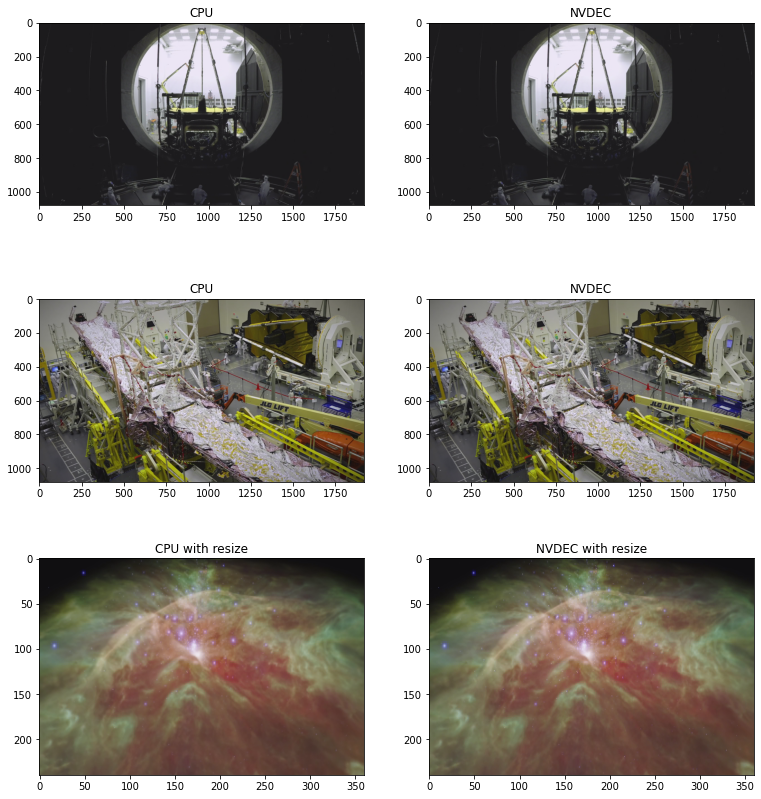
The following code shows some frames generated by CPU decoding and NVDEC. They produce seemingly identical results.
[30]:
def yuv_to_rgb(img):
  img = img.cpu().to(torch.float)
  y = img[..., 0, :, :]
  u = img[..., 1, :, :]
  v = img[..., 2, :, :]

  y /= 255
  u = u / 255 - 0.5
  v = v / 255 - 0.5

  r = y + 1.14 * v
  g = y + -0.396 * u - 0.581 * v
  b = y + 2.029 * u

  rgb = torch.stack([r, g, b], -1)
  rgb = (rgb * 255).clamp(0, 255).to(torch.uint8)
  return rgb.numpy()


f, axs = plt.subplots(3, 2, figsize=[12.8, 14.4])
for i in range(3):
  for j in range(2):
    axs[i][j].imshow(yuv_to_rgb(samples[i][j]))
    axs[i][j].set_title(
        f"{'CPU' if j == 0 else 'NVDEC'}{' with resize' if i == 2 else ''}")
plt.plot(block=False)
[30]:
[]
Conclusion¶
We looked at how to build FFmpeg libraries with NVDEC support and use it from TorchAudio. NVDEC provides significant speed up.